I got your attention, didn’t I? So what’s dirty editing? I don’t think there is an actual term coined for what I’m about to talk about. I’ve heard it referred to as checker-boarding, but I’m still not entirely sure that grasps the concept enough. So I’m going to call it dirty editing.
Dirty editing is using your timeline to its maximum potential. Dirty editing is an editor’s timeline that’s messy. Editors are often messy. We often put a clip here and there. We put stuff down in the timeline, not really knowing if we’ll use it or when we’ll use it. We just want it there in case we do use it.
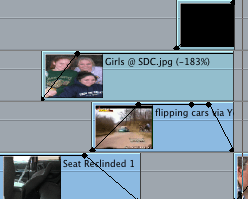
The finished product you output should be clean and polished. That does not mean your timeline has to be clean and polished. It’s your timeline, make a mess. Guess what? You don’t have to clean it up! This is the timeline for this story.

For this blog entry, we are going to us the story Sarah didn’t walk away at all.
I ended up adding a lot of effects on the story. I have several layers of video. Watch my timeline as we go along. Just because I only have one layer of video, that doesn’t mean it’s automatically going on video layer one.
Our story begins on video layer two. I had to put a reporter as-live in front of the package. This was actually one of the last things I did. I wanted to dissolve from the reporter to the package. I often like to play with the duration of my dissolves. If I keep both of these first two clips on video layer one and add a dissolve, I have to continually adjust the dissolve until I get the desired length I want.
I think it’s just easier to place one of your clips on video layer two, then use keyframes [:13] to drop the opacity at the place you want. I just move the keyframe until I get the dissolve I like.
 I do use a dissolve next at [:20]. I wasn’t too worried here. I knew I wanted a two-second dissolve centered on the transition.
 Pretty routine stuff so far. Now comes some serious dirty editing.
At [:24] I slowly dissolve up (using keyframes) the picture of Sarah. Notice it’s on video layer three on the screengrab of my timeline above. I know I want to have a car crashing (file blurred and turned black and white) underneath her picture. I don’t waste time moving things up and down the timeline (meaning changing video layers). It doesn’t matter that there is no video on video layer one for a moment. What matters is my final product looks the way I want it.
 Here is the picture of Sarah (cropped) and the car crash, and you can also see a seat underneath both of those clips.
- A tip. When you have multiple layers of video, and you want them to ALL fade to black at the exact same time. Use a slug-like you see below (In Final Cut & black video in Premiere).
 You can get a slug in the same drop-down menu you would engage the text tool in Final Cut Pro 7. You can also get slugs in Avid & black video in Premiere.
 Load a slug into your viewer and drag it to the timeline and place it on the video layer higher than you already have at that moment in your timeline. Change the opacity of the slug, just like any other clip.
I do go back to video layer one at [:31]

After the interview with the father, my timeline gets dirty again [:38].

I have a picture of Rebecca fading (increasing the opacity) upon video layer three. Then, I have a photo of her sister fading up on video two. Then, I have a picture of the seat belt on the video layer one. It all looks useful to the viewer. I’m merely maximizing my timeline. All non-linear editors give you multiple layers of video. Use them. Any way you like it. That’s the beauty of non-linear editors, they conform to you.
After these few shots, I have another shot of a seat belt and a shot of Sarah at 50% opacity with a garbage matte. Then look. I’m up on video layer three.
 And there is NOTHING on video layers one or two. I’m already up there why come down to video layer one? Just so, my timeline looks clean? Dirty editing at it’s best!
I don’t move back to lower video levels primarily for efficiency reasons.
- Already there, just keep editing
- It’s more efficient to just stay where you are and continue editing
- A skilled editor becomes a faster editor.
I’m placing another screengrab of my timeline here so you can refer back to it as you continue watching the story on my YouTube site. It’s Dirty. It’s just the way I like it!
 Thanks for reading!


 edit-foundry.com